














For general contractors and subcontractors
Know what a job costs before it closes
Many construction teams manage job costs in spreadsheets and email threads, so nobody has a shared, up-to-date picture of the job.
SMARTBUILD’s Job Costing bolt-on is built inside the project, so every budget, invoice, change order, and cost sits in the same project the team already runs.
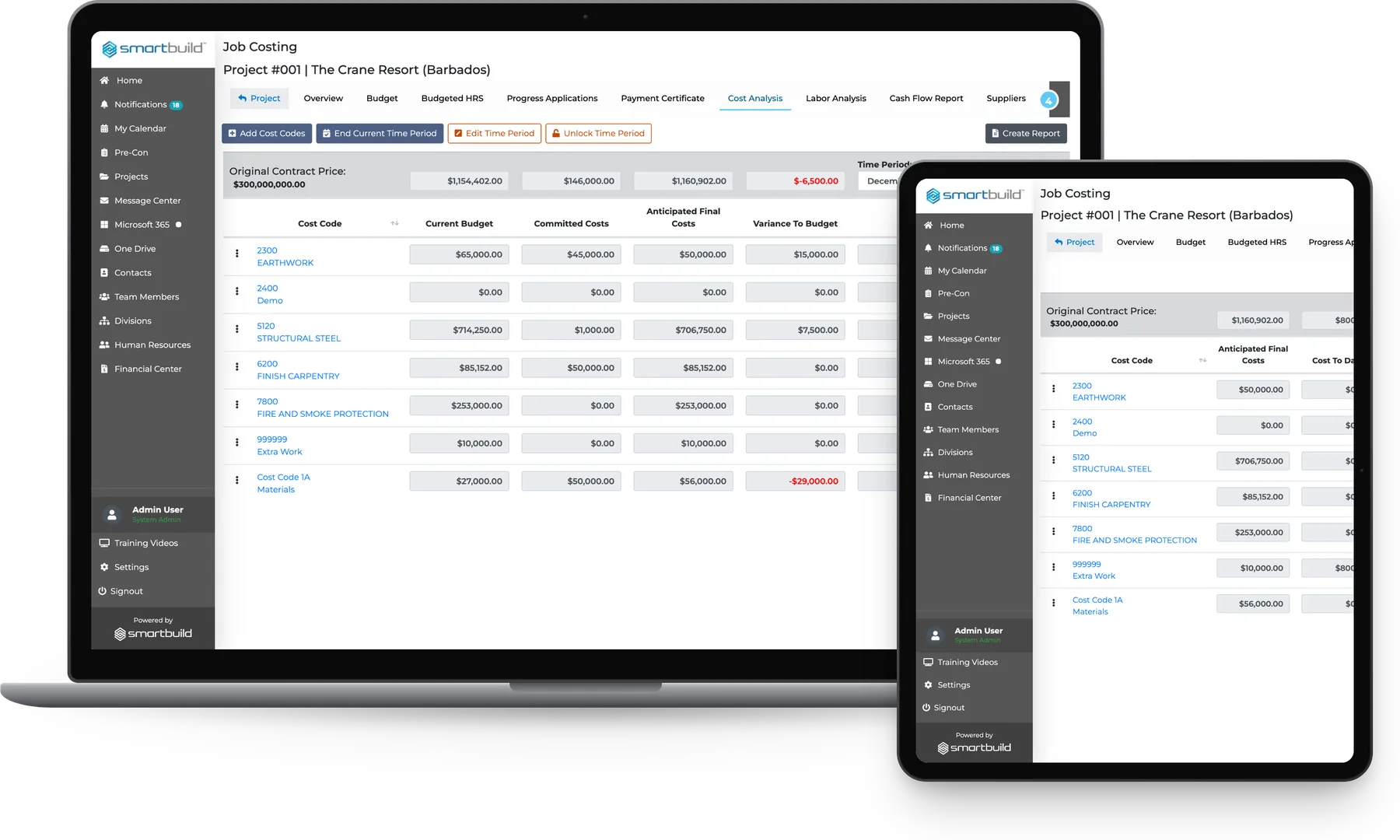
Cost overruns show up months after they start
Job costs are usually spread across an Excel file on the PM's laptop, a folder of approved invoices and a signed change order that never made it into the budget. Nobody can see the full picture until the job is over.
smrtMoney updates the budget the moment a cost moves on site, so the overrun shows up while there is still time to act.
| Spreadsheet / email | Standalone accounting software | smrtMoney |
|---|---|---|
| Spreadsheet / emailUpdated whenever someone opens the file | Standalone accounting softwareUpdated when a journal entry is made | smrtMoneyUpdated as invoices and change orders are logged |
| Spreadsheet / emailFinal cost is a number typed into a cell | Standalone accounting softwareNeeds a manual entry per project each period | smrtMoneyCalculated live per cost code every period |
| Spreadsheet / emailInvoices approved by email with no audit trail | Standalone accounting softwareA separate system, login and step | smrtMoneyLogged against a cost code in one step |
| Spreadsheet / emailOne spreadsheet per job with no portfolio view | Standalone accounting softwareReports run one project at a time | smrtMoneyAll active jobs on one screen |
The change order was signed but the budget never changed
| Today | On smrtMoney |
|---|---|
| TodayThe PM updates the cost spreadsheet when there is time. When the owner asks at month-end, the file is two weeks out of date. | On smrtMoneyEach invoice is mapped to a cost code on the day it is logged, and the anticipated final cost updates automatically. |
| TodayA subcontractor invoice is approved and paid but never mapped to a budget line, so the cost code balance does not change. | On smrtMoneyThe approval records the supplier, amount, approver, and payment date, and the cost code updates. |
| TodayThe owner calls each PM to build a financial picture. Three jobs take three conversations and most of an afternoon. | On smrtMoneyOne screen shows every active job with its contract value, cost to date, and anticipated final cost. Anything over budget shows in red. |
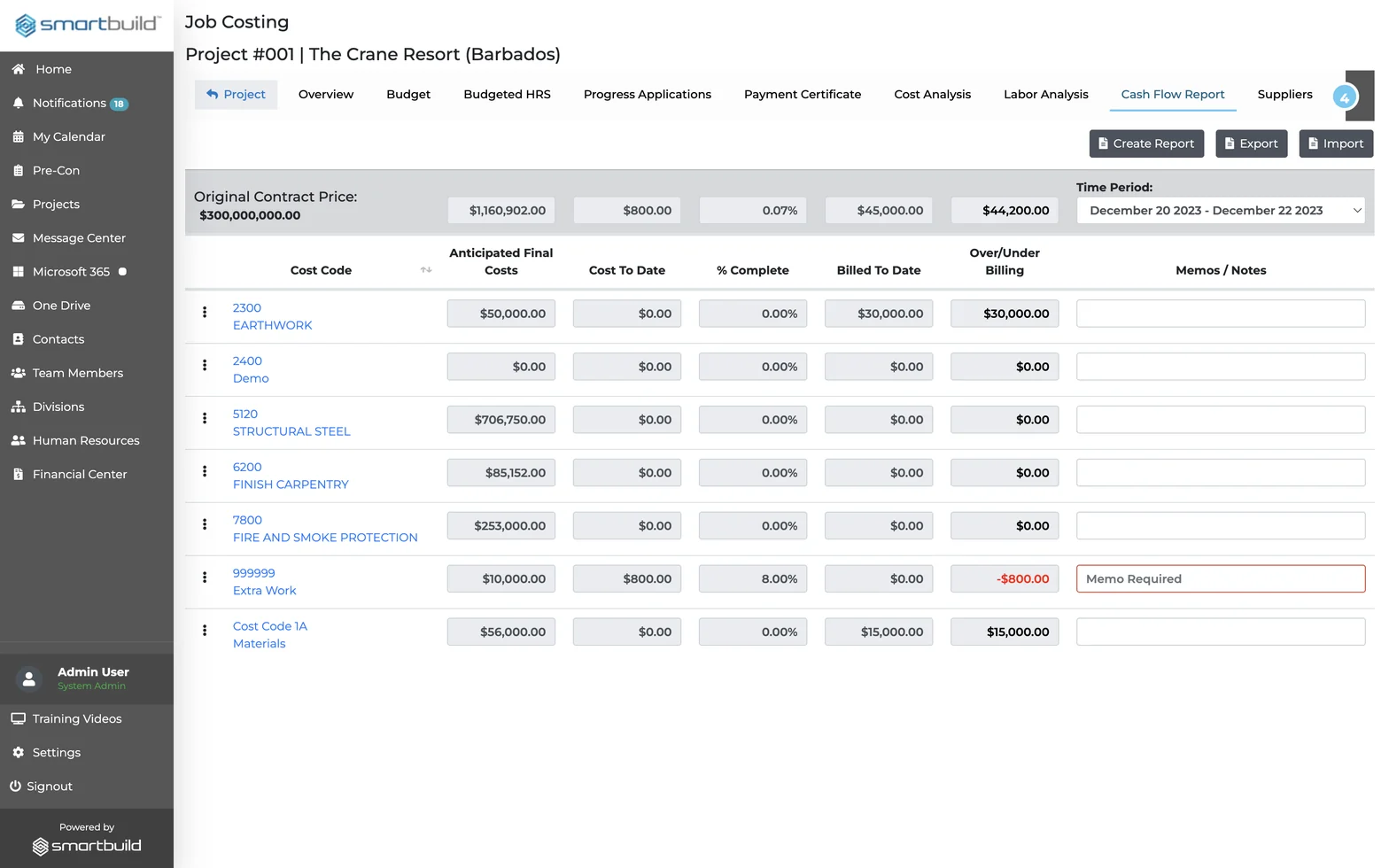
Costs are tracked live inside the job.
Every tool your PM needs for financial reporting on active jobs
There are no spreadsheet exports and no second login. The numbers live in the same project as the RFIs, change orders, and subcontracts.
Financial overview
Every active job is visible at once.
The overview is built for owners who run more than one job at a time and need to see cost problems early.
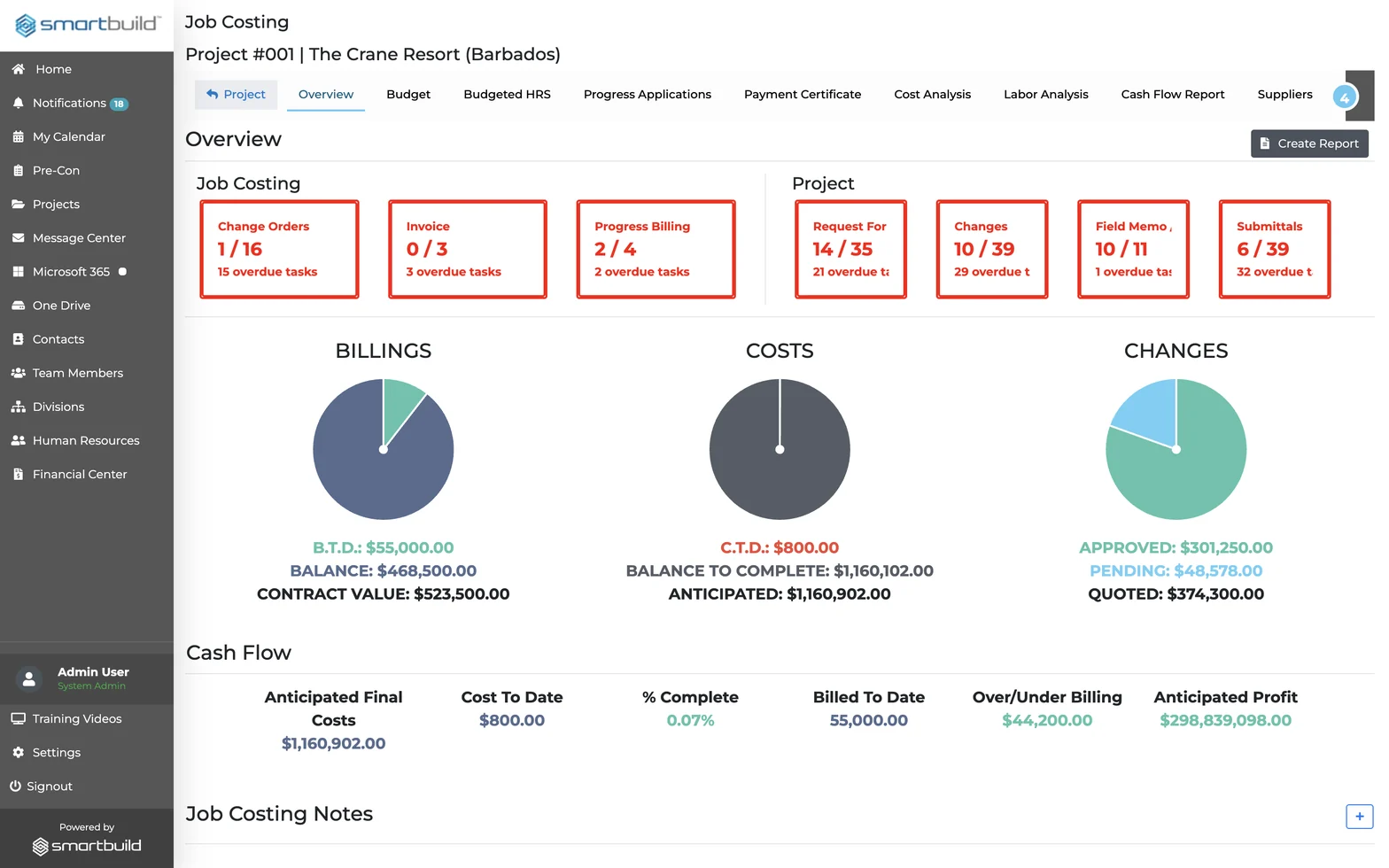
- Overview Dashboard: billings, costs, and changes live; overdue task alerts by category
- Cash Flow Report: cost to date, % complete, billed to date, over/under billing per cost code
- Cross-Project Dashboard: all active jobs: value, billing, changes, cost to date, anticipated final
An owner running twelve jobs sees all of them on one screen.
Budget and cost codes
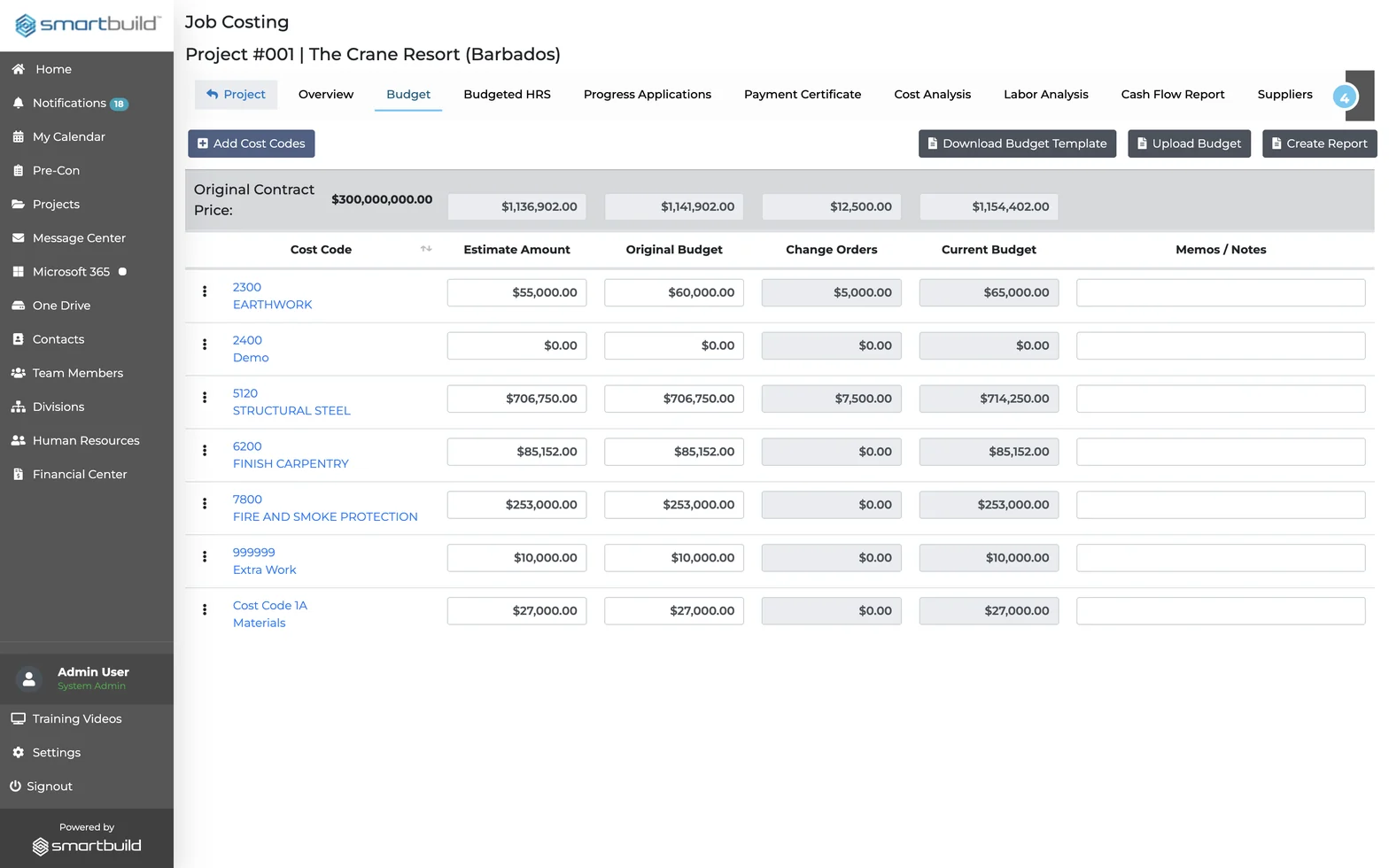
The budget is set once and every dollar is tracked against it.
Every invoice, change order, and hour maps to a cost code.
- Budget: original budget per cost code; change orders update it; current budget always visible
- Budgeted Hours: labor hour budget by cost code; estimate vs. original vs. current
- Cost Analysis: budget vs. committed vs. anticipated final per cost code; variances in red; lock periods
- Labor Analysis: budgeted vs. committed vs. anticipated hours; variance per period
The budget updates whenever the job changes.
Progress billing and payments
Each billing period closes with a full record.
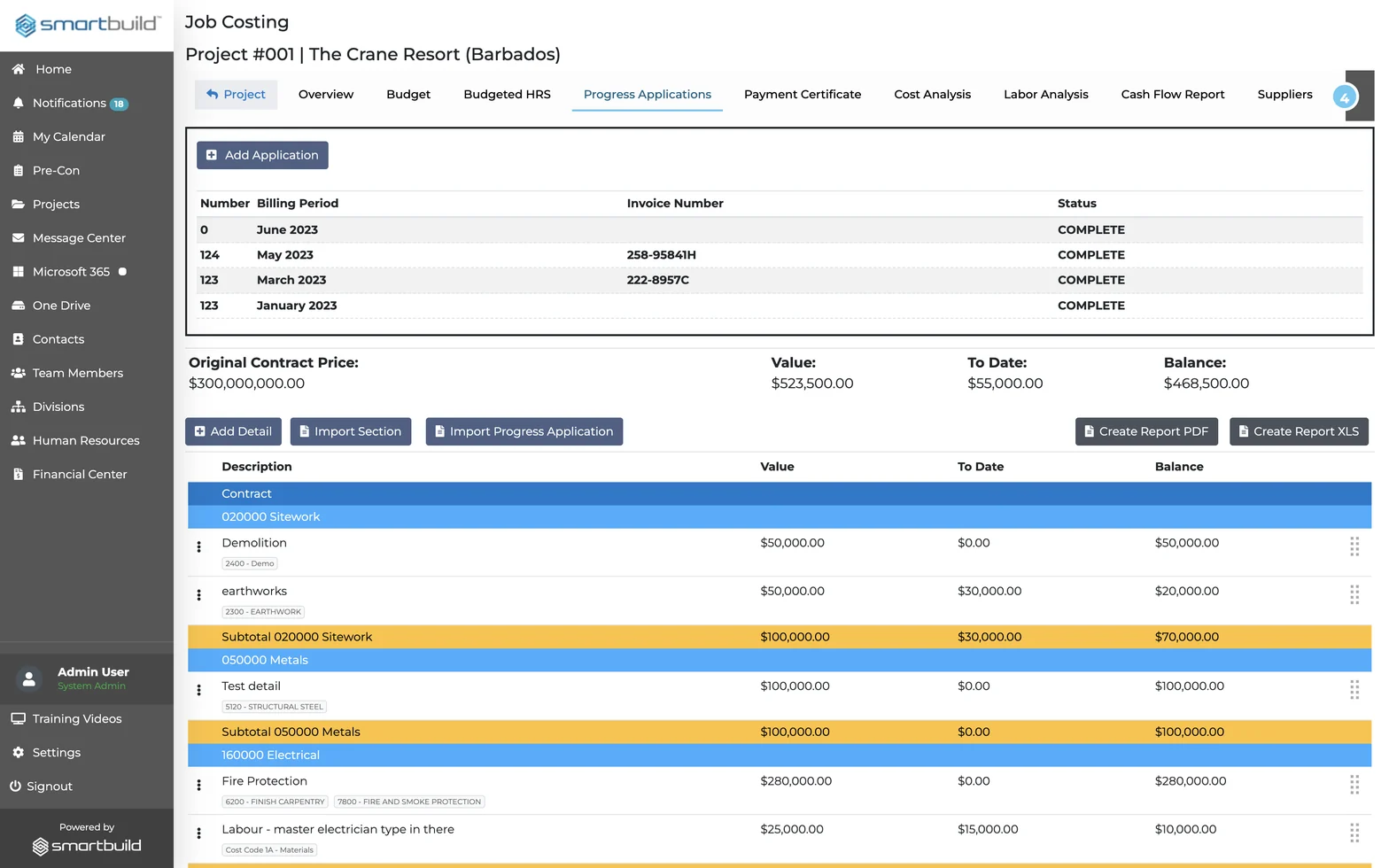
Every billing cycle is logged and every payment is traceable. Applications are AIA-formatted and exportable.
- Progress Applications: monthly AIA-style billing by division and section; export PDF or XLS
- Payment Certificate: upload and log owner payment certificates tied to each application
- Invoices: unapproved and approved queue; approval records who approved it and when
Every billing period is closed and every payment is on record.
Suppliers and procurement
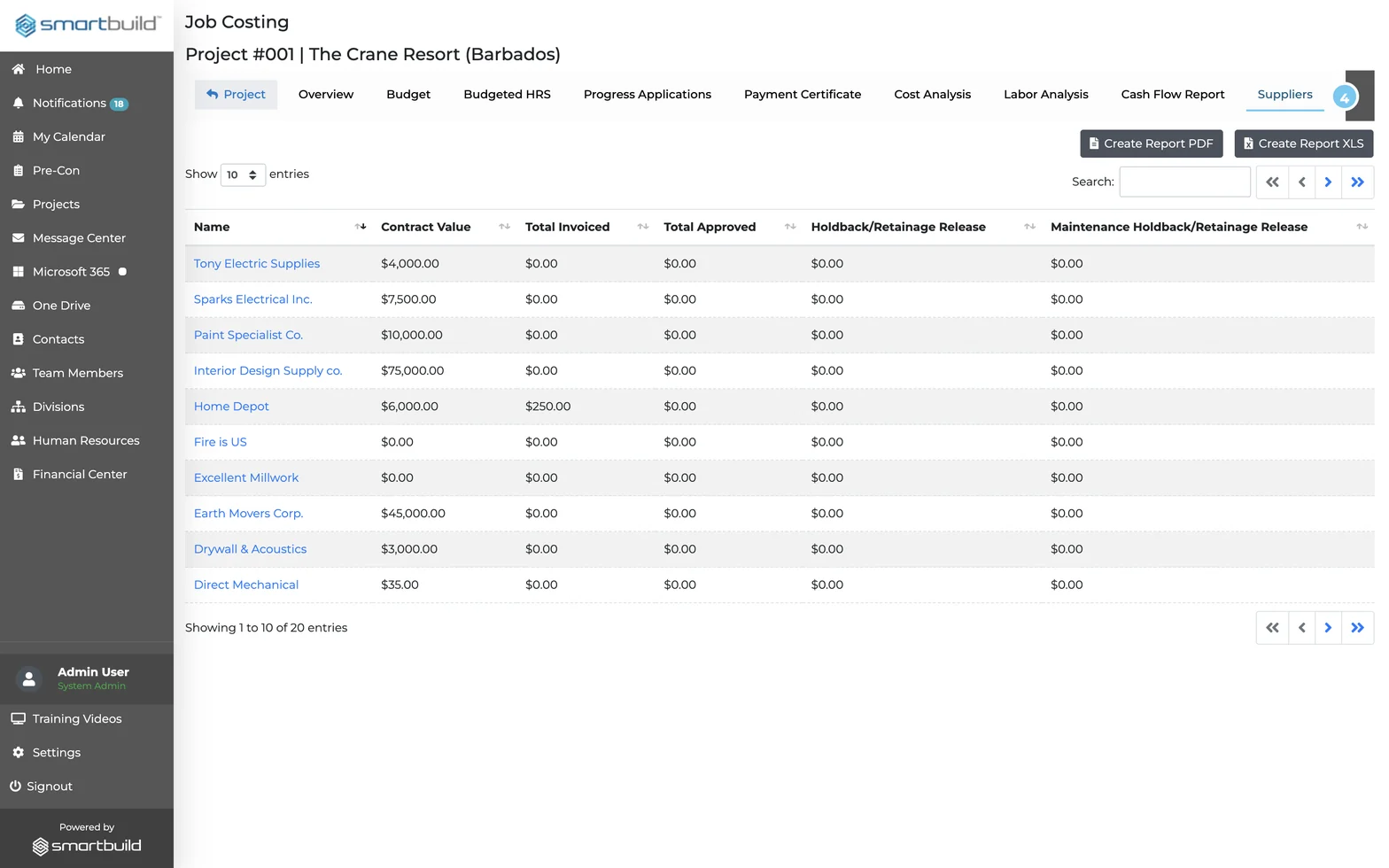
Every subcontract and PO is tracked.
Everything from the contract to the delivery slip sits inside the project it belongs to.
- Suppliers: contract value, total invoiced, total approved, holdback and retainage per trade
- Purchase Orders: issue POs to suppliers; overdue deadline alerts; send directly from the project
- Change Orders: linked to project changes; amount, approval date, next task, due date in one row
- Deliveries: log material deliveries: supplier, slip ID, date, issues, received by
Procurement and cost tracking happen in the same project.
Questions GC owners and subs ask before adding Job Costing
What is construction job costing software?
Construction job costing software tracks project budgets, committed costs, invoices, and anticipated final costs by cost code so a contractor knows where a job stands financially before it closes. Job Costing delivers this inside SMARTBUILD, alongside the project's RFIs, change orders, and subcontracts.
How does construction cost analysis work on an active job?
Construction cost analysis compares the current budget against committed costs and anticipated final costs by cost code, in real time. In Job Costing, variances are flagged in red and a memo is required before the period is locked, so every overage is documented.
What is the difference between committed costs and anticipated final costs?
Committed costs are amounts already contracted or invoiced against a cost code. Anticipated final costs include those amounts plus the projected cost to complete that scope. Unexpected costs on a job usually come from the gap between the two.
How does job costing connect to RFIs and change orders in SMARTBUILD?
Job Costing lives inside SMARTBUILD, so an approved change order updates the cost code budget directly. RFIs, field memos, submittals, and costs all sit in the same project. Nobody has to switch systems or copy figures between tools.
How is Job Costing different from tracking costs in a spreadsheet?
Job Costing shows current budget, committed costs, and anticipated final cost in real time, mapped to every invoice, change order, and PO. A spreadsheet only shows what someone entered the last time they opened it.
What does Job Costing cost and how long does setup take?
Job Costing is a flat-fee bolt-on to smrtGC or smrtSUB, with one price for the full team across every project rather than per seat. Contact us for current pricing. No long-term contract is required to start.
Watch one job go from budget to final cost
In thirty minutes, the demo takes a sample job through a real workflow: the budget is loaded, subs are committed, an invoice is approved and the cost to complete updates.
- This flat-fee bolt-on covers unlimited users and projects, with no long-term contract required to start.